Saturday, June 11, 2011

PE3_iMovie

Welcome back! I have been anticipating with great excitement my next adventure in Lynda.com. If you can believe it, I learned even more while watching the last few chapters and I can't wait to implement some of the effects in a previous video project. Are you ready? I certainly am, so here we go!

While watching the Effects chapter, I constantly found myself reflecting and thinking about the feedback I received from Michelle regarding my Interview Video. Before pointing out what is wrong with my video clip, I would like you to take a look.


So, did you notice how jumping the video clip was?  Now I would like you to watch the video clip after I stabilized the video and added a sound effect.

PE2_iMovie

Hello, I'm back to share more of my iMovie practical learning experience adventure. As I continued watching Chow's Training Videos via Lynda.com, I have learned so much more! In my past video projects, I usually tried to complete the entire project at once rather than short clips mainly because I really had no idea how to begin editing my projects. In fact, I did not attempt to do any editing at all until my last group project because I always feared losing my work after spending so many hours finally getting it recorded. Well, I am now fearless! Especially after learning I can trim a clip without actually losing my original clip. 


In addition, the days of me spending hours upon hours trying to create a video that contains no interruptions or starting the recording completely over because an unexpected sound or object has interfered with my recording are no more! After participating in Chow's online training, I feel so much more confident. Rather than recording a clip over or accepting the fact that there is an unwanted object in my video, I can simply crop the clip and the unwanted object disappears.


When choosing the crop feature, the clip appears in the viewer with a green edge as shown in the above screen shot. You can easily crop the clip by clicking and dragging any of the corners to zoom in, position the clip and click done. Sounds pretty easy, huh?  


Are you ready for yet another editing tool? I was pretty excited to learn about the advanced edit tool offered in the iMovie application. The edit tool will only appear on the tool bar if you have the advanced tool selected in preferences. So if you do not see the edit tool on the tool bar, simply click on iMovie, preferences, general, check show advanced tools. This editing tool allows you to add clips quickly and easily eliminating having to click and drag every clip to your project panel. I love it! I can't tell you how many times I was unsuccessful at clicking and dragging clips to my project. Often causing unnecessary frustration. Thank you for joining me on my training adventure in editing. I'm so excited to begin utilizing the editing features offered in the iMovie application.

PE1_iMovie


Aside from providing me with an opportunity to learn “cutting edge” technology that I can integrate into my educational curriculum to enhance the learning experience for my students, one of my greatest gifts of enrolling in the Educational Media Design and Technology program at Full Sail University was the ownership of my very first Apple laptop, MacBook Pro. Yes, you heard me correctly! I’m in the process of developing a strong and loving partnership with my new mate. Initially, I felt overwhelmed because I do not consider myself to be “tech savvy” nor did I have prior experience using a Mac. Hence, my first iMovie video assignment that consisted of less than 60 seconds of video, took me hours to complete. Through trial and error and discovery, my video quality has slightly improved.
One of my ETC assignments this week was a practical learning experience with iMovie ’11 Essential Training with Garrick Chow through Lynda.com. Lynda.com is basically an online library that offers software trainings and tutorial videos. 
To access Chow's online training, I used the search box feature on the home page.

Here is where my valuable practical learning experience began:

Almost immediately upon my start of viewing the iMovie Essential Training with Garrick Chow, two thoughts flashed through my mind. One being, I wish I had participated in this online training prior to my first assignment that required me to use iMovie and two being, my videos are evidence of why this training is essential.

Some of you may chuckle, but I'm being honest. I may or may not be alone on this, but my learning literally began on Chapter 1: Getting Started. 


Until I started the EMDT program, iMovie was completely foreign to me so I really had no idea what version I had. However, I easily followed the direction of Garrick Chow and soon discovered I had the 9.0 version. 

Although Chapter 2: Importing Video was also very informative, I want to focus more so on Chapter 3: Understanding the Interface. Again, some of you may chuckle, but I really wish I had the opportunity to participate in this training at the beginning of this program. In doing so, I could have saved a tremendous amount of time trying to figure out the basics and more time on perfecting my videos. I learned so much by watching this section.


For instance: I now understand the difference between the Project and Event Library and the panes associated with each. As well as how to properly use the Event Library to organize my videos rather than completely deleting all of my work when starting a new project to avoid confusion and frustration. In addition, I'm thrilled to learn that I can actually retrieve the projects I have previously trashed. Lastly, learning the different items in the tool bar and their functions is going to be extremely useful when creating future projects. Such as, rating clips, voice over, cropping, adding a selected clip without dragging, muting audio, adding titles, transitions and backgrounds. Although I have used some of these features in previous projects, I now have a better understanding of the implementation process and definitely feel more confident in utilizing the functions to their full potential.


Saturday, June 4, 2011

BP2_Little Bird Tales

http://littlebirdtales.com/home/default/


As a special educator, my students often struggle with the writing process. I chose to research, navigate and learn how to use the Web 2.0 tool, Little Bird Tales. Using this tool will help minimize stress levels for my students and provide them with a fun tool to use in creating, recording and publishing unique stories that can be shared online.  

Little Bird Tales is a free service, without advertising, links or merchandising that was created with kids in mind. This tool encourages creativity and self-expression while reinforcing the essential skills of reading and writing. 

3 Easy Steps


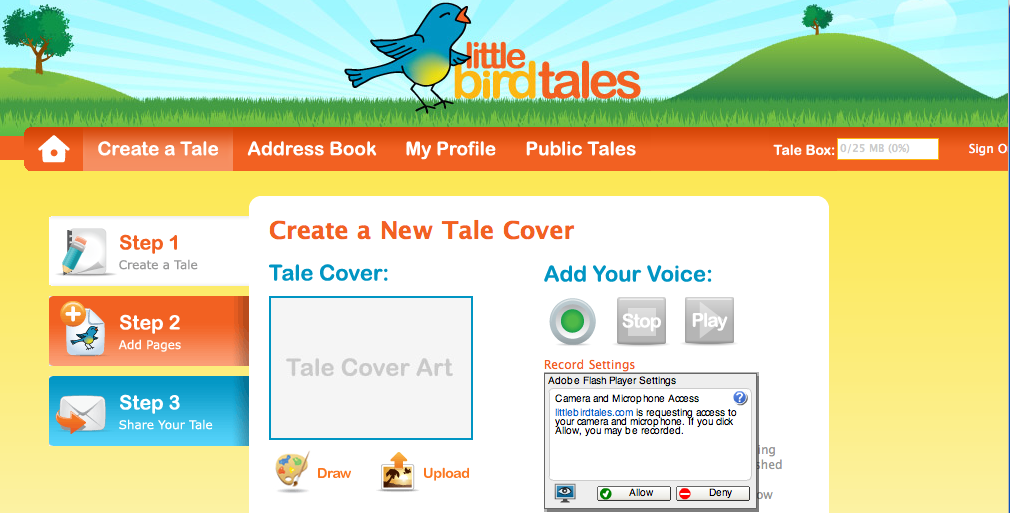
Little Bird Tales will guide my students through three easy steps in creating a unique story that can be connected to our curriculum no matter what the subject area. The steps in creating a story from start to finish are as follows:

Step 1:
Create a Cover by uploading a photograph or illustrating the cover using the drawing option and click save.

Step2:
Record your voice and text to each page and click save.

Step 3:
Email friends, teacher, or family your finished book.


Click here to view my Colorado Adventure story.


Click here to view a Little Bird Tale sample created by a student

Thank you for visiting and I encourage you to explore this fabulous Web 2.0 tool!


BP3_ iGoogle Screen Shots


Thank you for stopping by to check out my latest adventure! After many hours of determination, I have successfully created my Personal Learning Environment on iGoogle.  Wow! What an amazing learning experience for me. The smallest task of creating a Box of Links to attach to my tabs took me forever to figure out, but something I will NEVER forget. I am looking forward to utilizing my PLE throughout my time at Full Sail University and beyond! 


iGoogle PLE Home Page


iGoogle FSO/CBR Page


iGoogle FSO/CBR Page Extended


iGoogle ETC Page


iGoogle ETC Page Extended


Thank you for joining me on my PLE Adventure; come back real soon!

Thursday, June 2, 2011

BP1_Welcome to my blog post


“Winners take time to relish their work, knowing that scaling the mountain is what makes the view from the top so exhilarating.” - Denis Waitley
Welcome to my blog! I have always liked to live life like an adventure. Come along with me as I begin my exciting adventure into a new territory of blogging. I’m going to be exploring and discovering new technology and Web 2.0 tools with the intention of sharing my experiences to engage educators and learners. In doing so, I hope to inspire others who may be hesitant to explore uncharted territories. Thank you for visiting my blog; come back again to join me on my journey of discovery and exploration of the phenomenal technology opportunities available to us!